FAQ
DTED Resolution
| Level | SRTM | DTED Post Spacing | Horizontal Accuracy (CE90) | Vertical Accuracy (LE90) | Row x Column |
|---|---|---|---|---|---|
| Level 0 | N/A | 30 arc-seconds (900 m) | 121 x 121 | ||
| Level 1 | 3 arc-seconds (~90 m) | 3 arc-seconds (100 m) | 50 m | 30 m | 1200 x 1200 |
| Level 2 | 1 arc-second (~30 m) | 1 arc-second (30 m) | 23 m | 18 m | 3600 x 3600 |
| Level 3+ | Not applicable | Higher-res, varies |
What about [my state]?
DTED.org is currently in beta, covering only the state of California. Please contact us (info@snstac.com) to arrange hosting your state's data.
Will this overwrite my existing DTED data?
ATAK takes an additive approach to unpacking DTED data, that is, it will add new DTED data to existing DTED data.
For example, if ATAK is configured to use the WA.DTED.org server, and is switched to use the CA.DTED.org server, both states DTED data will persist on the EUD.
What is the DTED data source?
U.S. President Barack Obama released Shuttle Radar Topography Mission (SRTM) 1 arc-second (SRTM1) derrived DTED2 data on September 23, 2014. United States Geological Survey (USGS) makes SRTM1 derrived DTED2 data available at EarthExplore.
The National Geospatial-Intelligence Agency (NGA) is an Intelligence Community (IC) & combat support agency responsibile for defining the DTED standard for digital elevation model (DEM) data. DTED follows the specification MIL-PRF-89020B and is available from NGA
Other DEM specifications, including high resolution elevation (HRE) data & USGS GTOPO30, are not yet supported by DTED.org.
What is the source of the DTED2 data?
There are public, private and restricted sources of DTED2 data. DTED.org hosts SRTM1 derrived DTED2 for the United States, and DTED0 for the rest of the world.
SRTM1 data was colleted between February 11 and 22, 2000 aboard the Space Shuttle Endeavour (STS-99) using the Shuttle Radar Topography Mission (SRTM) mission payload.

- N.B.: Some restricted DTED data sources (including those from the United States Department of Defense) attempt to model the level of the ground. SRTM attempts to measure the hight of top cover (trees, rooftops, etc). Source
What's the difference between height, elevation & altitude?
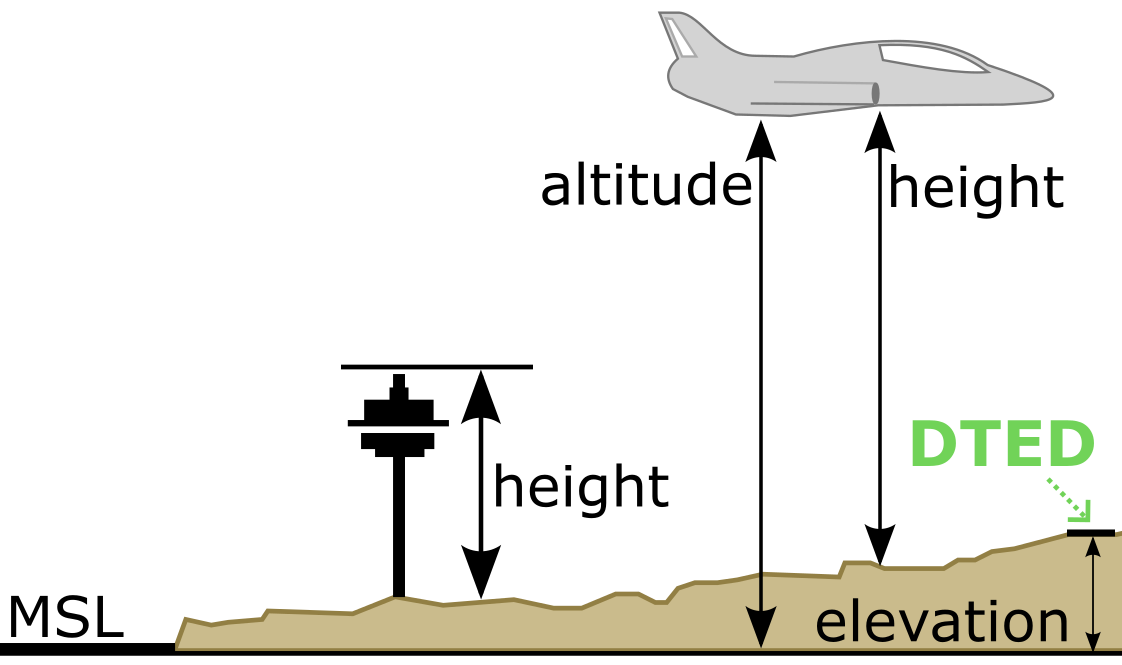
Simply put, height is the distance between an object and the ground. Elevation is the distance between mean sea level (MSL) and a point on Earth. Altitude is the distance between a point on Earth and a point in the sky.
DTED provides data on elevation, or the distance between MSL & a point on Earth (for example, the position of an EUD).
Why can't I use GPS elevation?
The global positioning system (GPS) uses World Geodetic System 1984 (WGS-84) ellipsoid surface as a reference mean sea level (MSL).
Can't I just use a Data Package?
Sure, here's a couple of alternative guides to utilizing DTED data within ATAK:
- DTED2 Instructional for TAK using USGS EarthExplorer (via Marshall Frith)
- Downloading SRTM DTED2 elevation models from USGS (via field_mapper)
- Loading DTED in ATAK (via Tough Stump Technologies)
- ATAK for Hikers (via Paul Mandal)
- Disseminating Remotely Sensed Products using ATAK (via Colorado CoE)
- ATAK DTED DP Downloader (via Rick)
- ATAK-Civ Tutorial B13: Elevation Tool (via ATAKwizard)
CivTAK.org guides:
- Downloading SRTM for TAK
- How to Download SRTM Data for use in ATAK/WinTAK/WebTAK
- Importing zipped SRTM/DTED into ATAK
- How to Tell SRTM Has Been Properly Imported into ATAK
- ATAK Tutorial -- Elevation Heatmap, Red X, SRTM/DTED Import
- Civilian DTED
Under the Hood
ATAK Off-the-Shelf
For each state, DTED.org creates an enhanced NW hemisphere DTED data file. The enhanced file contains both DTED0 data as well as DTED2 data for that state.
For example:
The TPC four-corners DTED file for NW contains this area of California at DTED0 (900 m) resolution:
w115/n32.dt0DTED creates a unique state-by-state four-corners DTED file for NW containing the file:
w115/n32.dt2This adds DTED2 (30 m) for that area of California.
Simple DTED Server
Provides and index and compressed DTED files for each state through normal plugin configuration using a state-by-state URL with the following schema:
- Server Name:
https://STATE.DTED.org- Where
STATEis your state's two letter abbreviation. For Example: For California (CA) Server Name:https://CA.DTED.org
- Where